We’ve all experienced disappointing interactions with AI or know people who “hate chatbots,” often because the “vanilla” experience isn’t useful, valuable, or enjoyable. That disappointment often has less to do with a model’s capabilities than with the experience itself: the interaction among people, an AI agent, and a desired outcome. This is a significant barrier to adoption, especially in enterprise settings, where poorly designed interactions can create overwhelm, ignore real-time context, or disregard user intent and behavior.
From this perspective, we’ve identified the benefits each pattern offers, the design challenges involved, and practical guidance for applying it. These patterns apply across interaction types and modalities, creating opportunities for both consumer-facing experiences and internal AI solutions that help knowledge workers make better decisions.
We want to share the emerging patterns we’re seeing—from both building and playing with many generative AI solutions—to help design better human-AI relationships.
Many of our interactions with technology, whether as knowledge workers or consumers, make everyday tasks more difficult than they should be. They limit our productivity, effectiveness, and value.
Knowledge workers and consumers alike can feel overwhelmed by the sheer volume of information, choices, and tools available. This constant barrage of often-contradictory messages makes it harder to make clear decisions or maintain focus. Research suggests that employees spend up to 40% of their workday just searching for the information they need (McKinsey). This information overload affects both productivity and well-being.
We also face a limited capacity for attention. Even when we can find information, we cannot process or analyze everything required to make an informed decision. We can focus on only a small subset of available data at any given time, often clinging to existing beliefs or ideas that limit our ability to consider alternatives or identify unexpected patterns.
The tools themselves often fail to recognize these limitations. Most technology is designed for “averages”—one-size-fits-all solutions that do not adapt to individual contexts. Whether we are using workplace software or consumer-facing apps, these tools rarely account for our needs, constraints, or unique circumstances. As a result, technology can become inefficient or counterproductive. Generative AI offers an opportunity to create more adaptive, personal interactions.
Finally, many work environments create unnecessary misery. Growing volumes of “busywork,” the pressure to be “always on,” and repetitive, low-value tasks contribute to disengagement and chronic stress. Although generative AI and AI agents could reduce or eliminate these experiences, many people still mistrust AI’s ability to improve work overall. People may resist the idea of “AI taking over” because they fear displacement or feel a sense of ownership over their work—even the tasks they dislike.
Applying AI alone is not a solution. Poorly integrated AI can create new tasks and anxieties, especially for knowledge workers. These challenges demonstrate the need for human-AI interactions that are not only efficient but also aligned with our cognitive capabilities, individual circumstances, and real-world constraints. The six patterns below outline approaches that acknowledge people’s needs and support a more adaptive, transparent, and meaningful relationship with AI.
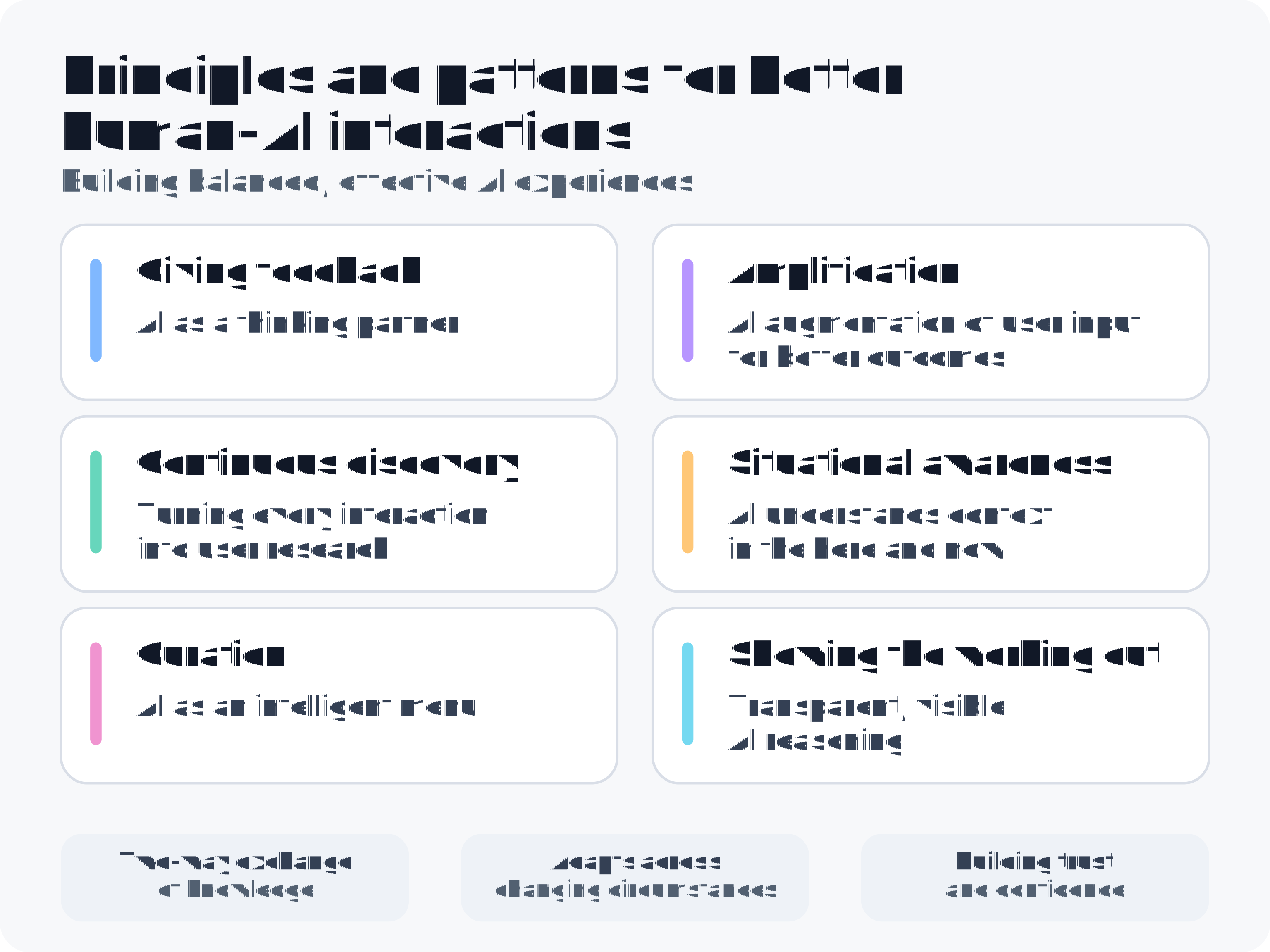
The relationship between emerging design patterns and principles for effective, human-centered AI experiences.
Curation: AI as an intelligent menu—AI curates and organizes information, reducing overwhelm by helping people navigate vast datasets.
Giving feedback: AI as a thinking partner—AI provides real-time, thought-provoking feedback that challenges assumptions and offers alternative perspectives.
Situational awareness: AI that understands the here and now—AI adapts to real-time context by continuously processing environmental information and user needs.
Continuous discovery: turning every interaction into user research—AI uses every user interaction to uncover insights and refine its understanding, ensuring ongoing learning and improvement.
Amplification: augmenting user input for better outcomes—AI enhances user input behind the scenes while preserving the users’ original intent.
Showing the working out: transparent AI reasoning—AI makes its decision-making process visible and useful, fostering trust and helping users make more informed decisions.
These six patterns show that effective AI solutions require more than a well-designed user interface. They shape how people and AI agents coordinate, make decisions, and interact within complex knowledge systems. The patterns improve human-AI interaction by:
Prioritizing two-way knowledge exchange: Enable a dialogue in which AI and people contribute ideas, context, and insights. This supports more capable AI systems informed by expert knowledge and intuition that are not yet codified.
Creating experiences that adapt and change across circumstances: AI tools can quickly become obsolete or irrelevant. Systems that maintain situational awareness, learn continuously, and adapt to each user’s circumstances remain useful over time.
Improving trust and confidence: Transparent, collaborative interactions lower barriers to adoption, increase engagement, and improve both human and AI decision-making. Thoughtful design helps people remain confident in a system’s decisions and outputs over time.
Designing effective AI experiences is challenging, but proven approaches can help. The core principles of understanding users and creating useful experiences still apply, alongside new considerations introduced by AI systems with agency. Experiences that curate information effectively, provide useful feedback, and learn transparently can reduce overload, improve decision-making, and build trust.
These patterns help overcome common hurdles to adoption, making AI genuinely helpful, adaptable, and more valuable for everyone involved.
The guide below explores each pattern in greater detail and explains how it can support a broader AI experience.
What it is: Instead of users manually sifting through endless search results or documents, AI agents can curate information from vast datasets and present the most relevant insights. In essence, the AI becomes a librarian, organizing knowledge to fit the user’s context.
Why it’s useful: By reducing information overload. The average knowledge worker spends 1.8 hours per day searching for information, which contributes to burnout for many employees (McKinsey). AI-driven curation addresses this by indexing, finding, and combining information from a wide range of sources, helping users find information, options, and insights they might miss through traditional search.
The challenge: Moving from traditional interface-based search to an agent-assisted approach requires users to adjust their expectations. People are accustomed to reviewing a list of links or pressing buttons to filter a dataset. An AI curator, by contrast, synthesizes answers from sources users may not know exist. This can reduce users’ sense of control over filtering and require them to trust the agent’s choices. Familiar search mechanisms can help people adapt to AI-driven curation without losing confidence or control.
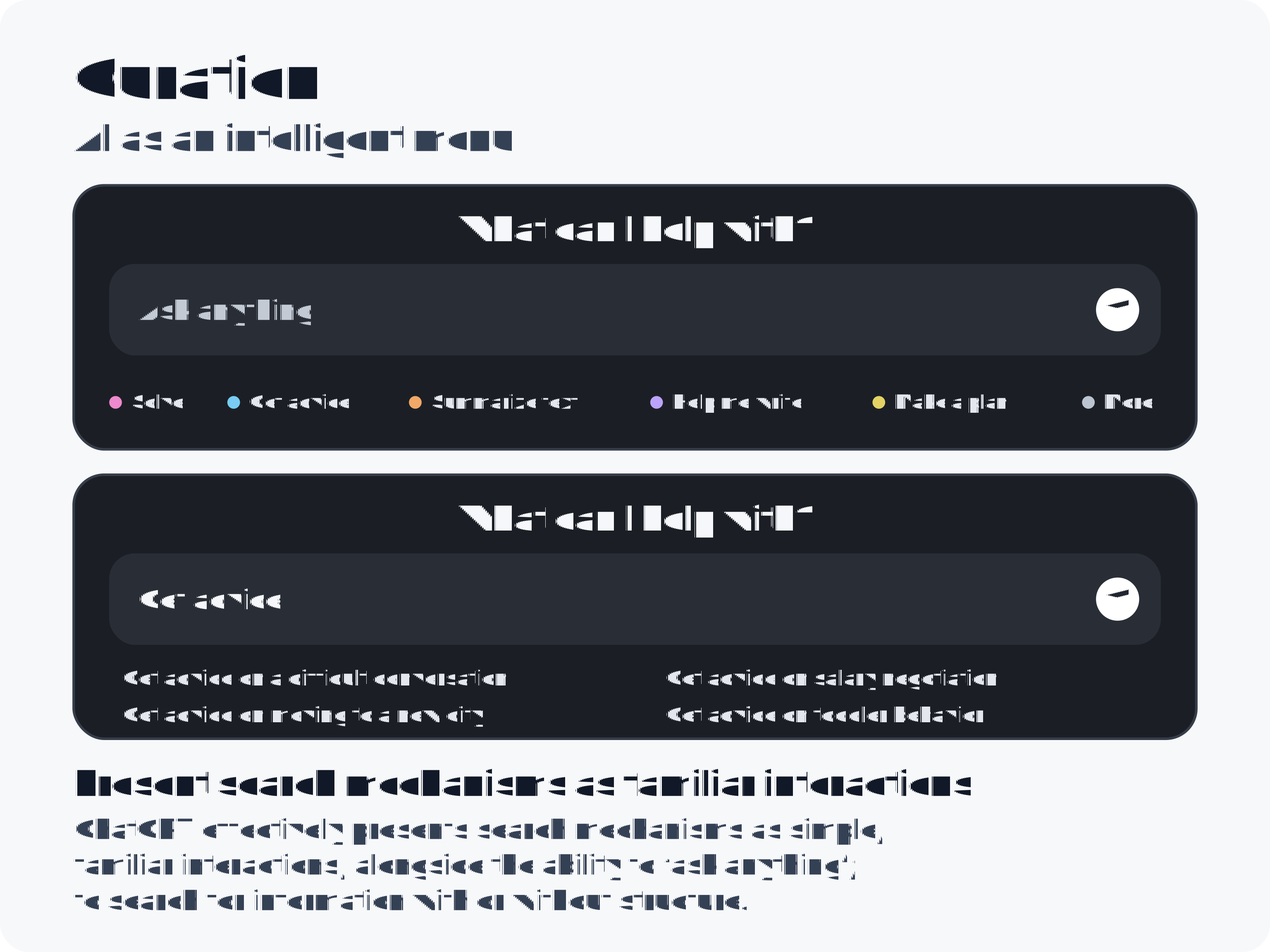
How OpenAI uses familiar interaction patterns to support structured and unstructured information discovery.
Present search mechanisms as familiar interactions:
To ease the transition from traditional search, present familiar interactions rather than blank canvases. Users will feel more comfortable when the experience builds on recognizable options, questionnaires, and contextual suggestions.
Use buttons as prompts instead of requiring open-ended input:
Free-text input can feel intimidating or time-consuming. Preset or automatically generated buttons make curation more accessible. For example, “Filter by most recent,” “Compare pricing,” and “Include global sources” can help users refine the results. This lowers the barrier to participation, encourages exploration, and shapes the AI’s recommendations around user intent.
Let users tell a story to refine search results:
Sometimes, storytelling communicates a user’s needs more effectively than direct queries or filters. In complex situations—such as navigating dense dashboards or searching for the right product—people may feel overwhelmed by traditional tools or unsure which parameters to adjust.
When users can “tell their story”—describing a pain point, personal goal, or desired product—the AI can translate that narrative into structured search parameters. For example, someone who says, “I just moved into a smaller home and need versatile, budget-friendly storage solutions,” could receive curated product suggestions, practical tips, and relevant recommendations.
By embracing storytelling, you not only reduce the cognitive burden of knowing what filters to apply but also foster more confidence and clarity in the final curated results.
Use memes and cultural references to personalize discovery:
Utilizing memes can aid AI curation in two ways: they enrich the agent’s understanding of the user, and they bring search results to life in a more human, relatable way. First, by selecting or referencing memes that illustrate their goals, mood, or style (“I’m feeling the ‘Treat Yo Self’ vibe today!”), users are effectively sharing their “theory of mind” with the AI. This helps the agent fine-tune its curation by inferring context that might be lost in a standard graphical interface or text query.
Second, the agent can “play back” results in thematic or pop-culture-inspired “starter packs,” making recommendations feel more relevant and personalized. For example, if someone is redesigning a home office, the AI might create a “WFH starter pack” that combines desk accessories, technology, and inspiration.
Create clarity for the user through next best actions:
Whether an AI agent’s results hit the mark or not, users should be able to refine the parameters easily. For example, they might ask, “Show me more like item 2,” or, “Exclude sources older than 2020.” Suggested next actions can guide new users without overwhelming them.
What it is: AI agents are often discussed as a way to delegate traditionally human work. Their ability to act as real-time collaborators receives less attention. Rather than simply following instructions or generating content, an agent can ask thought-provoking questions, challenge assumptions, and offer alternative perspectives. This makes AI a thinking partner that helps users improve their work as it develops.
Why it’s useful: We all benefit from timely feedback, but we do not always receive it. Both dissent and advocacy can help us identify patterns before becoming too attached to an idea. AI agents can challenge our assumptions, generate ideas, and suggest alternative interpretations of data without replacing human judgment. We’ve found that people often respond well to this kind of agentic feedback.
AI agents can generate counterarguments that reveal gaps in reasoning or highlight alternative perspectives.
The challenge: AI feedback must be intuitive and actionable, or it becomes a distraction. People do not welcome an agent that interrupts with irrelevant suggestions or nitpicks every detail. The AI should intervene at appropriate moments and with the right tone. If it is too passive, useful opportunities are missed; if it is too aggressive, users may feel second-guessed.
The challenge lies in how to surface the AI’s feedback: should it appear as hints, as an optional review, or as a two-way dialogue? Getting the interaction right will determine whether users embrace the AI as a partner or simply see Clippy 2.0.
Ensure that feedback is proactive but not annoying:
Let the AI offer suggestions at natural breakpoints. In a document editor, for example, it might wait until a sentence or paragraph is complete before suggesting a revision. We’ve also explored letting an agent wait briefly after a blank text field is selected before offering help. Tone matters: “Here’s an idea to consider…” feels more constructive than a blunt assertion.
Turn feedback into an exploratory dialogue:
If feedback is unclear, make it easy for users to ask questions such as, “Why do you suggest changing this?” A curious AI persona can make the exchange feel more constructive. Like a thoughtful therapist or facilitator, the agent can ask relevant questions at the right moment, turning feedback into a conversation that helps the user learn.
This also helps the AI gather context, allowing both the user and the agent to develop a clearer shared understanding.
Offer multiple options, ideas, or alternatives:
Instead of offering one idea, solution, or challenge, an agent can present several perspectives. For example, a design agent might generate three alternative layouts, while a writing agent suggests different versions of a sentence for different audiences. Providing options reinforces that the user remains in control.
Make sure that feedback is context-aware:
The agent should adapt its “thinking partner” role to the user’s current context. If someone pauses at a question or text field, the AI might ask a thought-provoking question instead of jumping in with a complete answer. When a user only needs a sentence rephrased, a concise suggestion that can be accepted or rejected helps preserve their ownership.
Crucially, the AI must know when to step back—prolonged back-and-forth can lead to a “doom loop” of endless edits, undermining the user’s confidence. By staying attuned to context and user actions, the AI agent can tailor its feedback to be genuinely helpful without overstepping.
What it is: Situational awareness is an agent’s ability to interpret contextual information in real time and adjust its behavior accordingly. Rather than relying only on predetermined inputs, AI agents can continuously process information about the environment, the user’s current state, and other relevant conditions.
This could mean adapting an interface to a user’s immediate needs or interpreting current market conditions to make responses more relevant.
Why it’s useful: The real world is not static. Situationally aware AI systems can be more useful because they respond to current conditions. When an agent understands relevant context, interactions feel more natural, personalized, and grounded.
The challenge: Building genuinely situationally aware AI is challenging. Accessing and integrating the necessary data can introduce significant technical complexity.
There is a fine line between helpful contextual awareness and intrusive overreach. Users appreciate an agent that “gets it” but may feel uncomfortable if it requests too much information or seems overly persistent. Because circumstances can change quickly, human expertise and judgment remain essential.
An effective AI system therefore needs users’ input to maintain a useful, current understanding of their circumstances.
Show users what good context looks like:
Reasoning models such as OpenAI o1 have changed how people provide context to large language models. Regardless of the model, detailed context supports more relevant responses. Clear examples, placeholder text, and expandable tips can show users what information to provide and explain why it matters.
Explicitly showing the user what “good context” looks like can remove the guesswork that stops people from otherwise specifying meaningful details.
Make it easy to define the agent’s boundaries:
A user’s immediate needs are important but may not be obvious. A situationally aware agent can work with the user to define the topics, domains, and tools it should explore. Deep research in ChatGPT supports this approach by asking clarifying questions before beginning a research task.
Offer visible context for quick edits and additions:
Users may need a snapshot of what the AI currently assumes about their goals, focus, and data sources. A dedicated panel can explain its knowledge cutoff, current assumptions, and relevant inputs. An icon could indicate when location data is being used, while a summary might show how many records contributed to an insight.
People benefit from seeing what the AI “knows” and being able to add, remove, or update relevant context with minimal friction.
Let the AI select UI features based on usefulness:
AI agents can selectively enable or disable capabilities based on situational cues. When someone is drafting a white paper, an agent might activate advanced citation tools; when they are editing speaker notes, it might highlight editing features. This supports focused experiences without requiring users to manage every setting manually.
What it is: Experience design and product development often treat user research as a distinct phase at the beginning of a project or at set intervals. Continuous discovery treats understanding user behavior, needs, and preferences as an ongoing process. AI can turn conversations, clicks, and feedback into opportunities to uncover insights that users may not explicitly articulate.
In essence, the AI continues learning and adapting to the problem space in real time.
Why it’s useful: It can be difficult to gather useful feedback from experts, practitioners, and general users about an AI output’s effectiveness or usability. Agents can help capture reactions, insights, and intuition in context, while the experience is still fresh.
The challenge: Feedback often captures what happened or whether a user liked an outcome without explaining why. Asking people to remember and document every step of their thinking can feel burdensome, even when those insights would improve a system’s future capabilities.
This is particularly important in tightly constrained AI systems, where an open-ended conversational exchange may be neither desirable nor possible.
Use descriptive flags to capture reactions:
A simple “thumbs up” or “thumbs down” rarely explains a user’s reaction. Descriptive flags—such as “helpful for budget planning” or “missing regulatory information”—provide more useful context. These flags can reflect the current interaction or invite users to share a brief perspective, turning a rating into information the AI can learn from.
Steer AI agents with “flashcards”:
When the AI makes a mistake or only partially succeeds, give users a simple way to correct or “teach” it. For example, an agent might ask, “How would you phrase it?” or, “What detail did we miss?” The resulting guidance can be stored for the current interaction or reused later.
Learn from iteration and variation:
Sometimes the best feedback comes from trying again. Simple regeneration controls let users compare new options and identify the ones they prefer. These choices connect the original input to a more useful outcome and make experimentation part of the learning process.
Observe interactions:
AI agents can work together to learn across multiple interactions. For example, while one agent creates a research summary, another could analyze the exchange to evaluate the experience. Acting like ethnographers, these agents can identify differences between a person’s intent and their perception of the output’s quality.
These observations can support continuous improvement by surfacing insights and suggesting changes to the system.
What it is: Amplification adapts a user’s input, prompt, or instruction to produce a better result while preserving the original intent. The AI performs additional behind-the-scenes work beyond the explicit request. For example, “shadow prompting” can enrich a query before the system generates a response.
The user provides an initial idea, and the agent expands that input when doing so can improve the outcome.
Why it’s useful: People often provide brief or high-level instructions, while the best response may require additional steps. AI agents can bridge that gap without requiring users to explain everything. For example, asking an AI to “brainstorm marketing ideas for my new coffee product” might otherwise produce a generic list.
An amplified approach could run several increasingly ambitious brainstorming sessions and combine the strongest ideas, creating a richer and more varied result.
The challenge: Working behind the scenes can reduce a user’s sense of ownership and transparency. If an AI modifies someone’s request without explaining the change, it may produce an outcome the user did not want. Designers must balance useful amplification with the risk of unwanted manipulation.
The design challenge is to let users guide amplification when they want to.
Preserve the user’s intent and build on it:
Amplification should enhance a user’s stated goals without introducing new ones. After the AI expands a prompt or completes background tasks, it or a separate validator should compare the final output with the original request. Unexpected additions should be communicated clearly.
Use amplification for safety and creativity:
Techniques such as shadow prompting can raise concerns about covertly reshaping user requests. To maintain trust, use them to improve clarity, safety, or completeness without undermining the user’s intent. If a safety-related adjustment is required, explain it or provide immediate feedback.
Users may see a moderation result without seeing the underlying logic or criteria.
Borrow tried-and-tested facilitation techniques:
AI agents can apply facilitation and collaboration methods, such as Liberating Structures, to shape productive interactions. These lightweight frameworks help maximize a person’s creative and analytical potential.
The agent can draw on familiar brainstorming and idea-filtering methods during a conversation. Small changes in how the exchange unfolds can generate a broader range of ideas and insights.
Use parallel threads to surface useful content:
Rather than relying on a single linear exchange, an agent can explore several interpretations, ideas, or solutions simultaneously. This resembles a group of experts brainstorming from different perspectives without losing useful insights.
A coordinating process can combine those different lines of exploration into a coherent, actionable response.
Use amplification to educate users:
Well-designed amplification can also help people learn how to interact more effectively with AI. If an agent explains, “I considered X and Y in my answer,” users may include those factors in future requests. This creates a two-way improvement: better responses now and better inputs over time.
What it is: This pattern makes AI agents’ reasoning easier to understand. Thoughtful interactions can explain why an agent produced an answer, highlight supporting sources, or make relevant steps in its process visible. The goal is to support effective human decision-making without overwhelming the user.
Showing relevant reasoning works best when users can explore it incrementally and choose the level of detail they need.
Why it’s useful: Trust is essential for AI adoption, particularly in enterprise settings. People are less likely to rely on a system if they cannot understand or verify its behavior. Transparent outputs make it easier to diagnose problems, correct mistakes, and repeat useful approaches.
The challenge: Explaining AI decisions can be difficult. Too much detail may overwhelm users, while probabilities or lengthy reasoning summaries can be hard to interpret. Transparency alone also does not guarantee accuracy.
Designers must consider the quality of the explanation, the clarity of its presentation, and how supporting evidence can become part of a useful dialogue.
Allow agents to think expansively, then compress the results:
AI can analyze a problem deeply while presenting the results in a digestible format. Hierarchical summaries and progressive disclosure allow users to start with the main insight and expand supporting details only when needed.
A well-designed interaction can make complex information easy to explore without sacrificing depth or clarity.
Provide explorable citations and references:
AI-generated answers should give users a clear way to inspect supporting sources. This might include links, excerpts from internal reports, relevant research findings, or a deeper view of quantitative data.
In retrieval-augmented generation systems, for example, users should be able to move from an AI summary to the evidence behind it. This supports verification and enables the deeper inquiry that builds trust.
Communicate important progress signals:
Complex agent workflows may involve changing direction, revisiting earlier steps, or combining multiple lines of investigation. Users tolerate delays more easily when they understand what is happening. Clear progress updates can explain what the agent has completed, what it is doing, and what comes next.
The agent should also explain when it is stuck or when a decision requires additional perspectives.
Reveal AI outputs step by step:
Rather than presenting an entire response at once, an agent can reveal information in stages. An investment assistant, for example, might show a brief recommendation with an option to expand its rationale: “Step 1: Assess the risk profile. Step 2: Review the current portfolio. Step 3: Identify diversification opportunities. Step 4: Formulate a recommendation.” Users who want more detail can explore each step, while others can stay with the summary.
Use visual explanations of AI reasoning:
Explanations should be as understandable as the primary output. When reasoning involves numbers or relationships, charts and diagrams can help. Visualizing an agent’s queries, process, reasoning, and sources can also help users correct its course, explain the result to others, or repeat the process later.
Clear visual explanations help users understand and act on information more quickly.